
Discord bot
The finds bot for your Discord
Someone posts a Taobao, Weidian or 1688 link, the bot answers with photo, price, QC photos and buy buttons for your agents. Your referral codes, your choice of agents. Free.
Set up in a minute, no sign-up needed.
Alex Today at 12:00
https://weidian.com/item.html?itemID=7824695026

ChinaGrailsAPPToday at 12:00
ChinaGrails
Nike Tech Fleece Tracksuit – Black
Price
$26.79 · ¥179
QC photos
12 photos on ChinaGrails
Weight
≈ 594 g
Seller
Husky
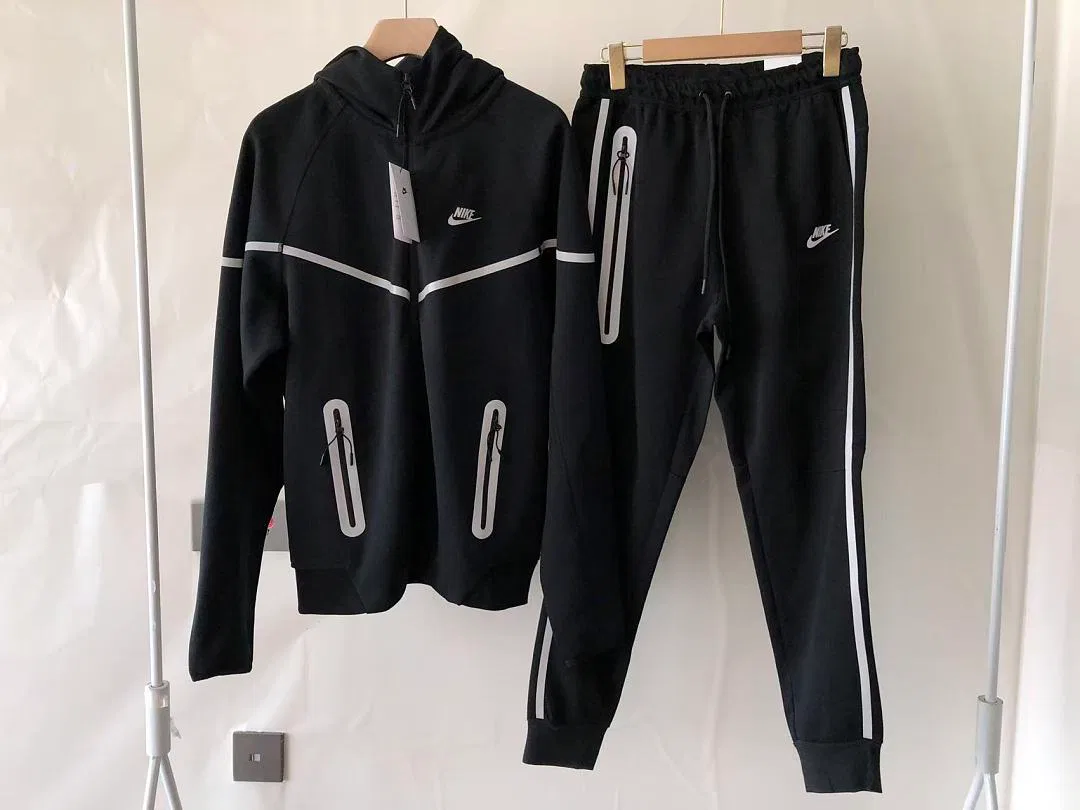
chinagrails.com · QC photos, prices and every agent
 Buy on HipoBuy
 Buy on LitBuy
 Buy on KakoBuyQC & details on ChinaGrails
Message #finds
Every link becomes a card
Shop and agent links posted in the chat get an answer with photo, name, price and buy buttons. Also for listings that aren't in our sheet.
Your referral codes
Enter your own code for each agent. The buttons in your server then carry your codes.
Your agents
Show one agent, a few partners or all of them. You decide what sits under each link.
Search by name
/find looks through the ChinaGrails sheet and shows the best matches with price and QC.
Search by photo
/imagesearch takes a photo or screenshot and shows the closest finds.
Outfit ideas
/outfitgenerator posts a complete outfit with a link for every piece.
Set up in three steps
- 1
Add the bot
Click “Add to Discord”, pick your server and confirm. You need the “Manage Server” permission there.
- 2
Run /setup
Choose the agents the bot shows, enter your referral codes and pick the currency of the prices. Only you see the settings.
- 3
Paste a link
Post a product link in any channel. The bot answers right away.
Commands
/link- Turns a product link into a card with buy buttons.
/find- Searches the sheet by name.
/imagesearch- Searches the sheet with a photo or screenshot.
/outfitgenerator- Posts a random outfit with every piece linked.
Convert link- Right-click a message, then “Apps”: converts the link in that message.
/setup- Agents, referral codes, currency and auto-reply. For server admins.
Works with these agents
Pick any of them in /setup. New agents on ChinaGrails show up in the bot too.
- HipoBuy
- LitBuy
- KakoBuy
 OopBuy
 USFans
 Sugargoo
 CSSBuy
 LoveGoBuy
 GTBuy
 BoonBuy
 Superbuy
 OssBuy
 PikoBuy
 JoyaGoo
 ZentBuy
 OrientDig
 WheeBuy
 iTaoBuy
 LoloBuy
 BBDBuy EU
 KingGoBuy
Questions
Does it cost anything?
No. The bot is free for every server.
Whose referral codes are in the links?
Yours, for every agent you entered a code for in /setup. Agents without a code from you link with ChinaGrails' code. Before you run /setup, the bot shows three agents with ChinaGrails' codes.
Which currency are the prices in?
US dollars to start with, and the price in yuan always stands next to it. In /setup you can switch to euro, pound, Swiss franc, złoty, Canadian or Australian dollar, or to yuan alone.
Which links does it understand?
Taobao, Tmall, Weidian and 1688 links, their short links, and product links of the agents. If the item is in the ChinaGrails sheet, the card also links its QC photos.
Can I stop it from answering every link?
Yes. Switch auto-reply off in /setup and the bot only answers /link and “Convert link”. To keep it out of one channel, take away its “View Channel” permission there.
What does the bot read?
It looks at messages only to find product links and stores no chat messages. Per server it keeps the server's name, the settings from /setup and a usage counter. A photo sent to the image search is used for that search and not kept.
Are there limits?
Finds from the sheet have none. Listings outside the sheet and image searches have a fair daily limit per server, so the bot stays fast and free for everyone.
Which language does the bot speak?
English, in every server.
Something isn't working. Where do I get help?
Ask in our Discord server. We answer there.
Ready for your server?
Add the bot, run /setup, done.